Wiggle — Onboarding & Configuration Reference§
Everything a new contributor or operator needs: what Wiggle is, how to get it running, how to author workflows, and every configuration option in one place.
- New to the code? Read §1–§4.
- Writing a workflow? §5.
- Deploying / tuning? §6 (the full config reference) and §7.
1. What Wiggle is§
A durable state-machine platform. You describe a process as a graph with a
java.util.stream-style DSL; a server runs it as a durable state machine (tokens over the graph)
that survives crashes and resumes where it left off; workers pull work when they have capacity and
run the step logic. See README.md for the elevator pitch and docs/local-execution.md for the
execution-mode deep dive.
Core properties: durable (survives restarts), exactly-once dispatch and at-least-once execution, pull-based workers (no inbound connectivity), immutable published definitions, and multi-node clustering over a shared database.
2. Getting the code§
git clone https://github.com/hadielmougy/wiggle.git
cd wiggle
./gradlew build          # compiles everything and runs the test suite
Prerequisites:
- JDK 21+ (the Gradle toolchain pins language level 21).
- The Gradle wrapper is committed (
./gradlew); no local Gradle needed. If it's ever missing, regenerate once withgradle wrapper --gradle-version 8.10. - Docker only for the Postgres cluster demos (§4.3); nothing else needs it.
Dev loop:
./gradlew build                        # full build + tests
./gradlew check                        # tests only (JUnit)
./gradlew :tests:run                   # the conformance scenarios, framework-free, no network
./gradlew :module:test --tests "Foo"   # a single test class
Branch off main, keep changes focused, and run ./gradlew check before pushing. Schema changes
go through the migration runner (§7.4), never by editing an already-released migration.
3. Modules§
| Module | What's in it | Published artifact |
|---|---|---|
core |
JSON, the compiled graph model, retry policy, execution mode, wire records | wiggle-core |
proto |
the WiggleControlPlane gRPC service + generated stubs |
wiggle-proto |
client |
the workflow DSL, WiggleClient, the pulling Worker |
wiggle-client |
server |
engine, cluster manager, housekeeper, queue-lag monitor, gRPC API, /healthz probe, in-memory store, injected StorageFactory |
wiggle-server |
jdbc |
shared dialect-aware, HikariCP-pooled JDBC store | wiggle-jdbc |
postgres |
PostgreSQL dialect, plus H2 for tests and local runs, and the PostgresStorageFactory that maps a URL scheme to one of them |
wiggle-postgres |
election |
leader election by announce-and-heartbeat, used for intra-cluster leadership | (not published) |
dist |
runnable standalone server (what the Docker image runs); its WiggleStorageFactory is PostgresStorageFactory under the published name |
(not published) |
example |
order-fulfilment demo, standalone worker/submitter, benchmark | (not published) |
tests |
conformance scenarios + JUnit wrapper | (not published) |
Published under group sh.wiggle, version 0.0.10 (the runnable dist module is not
published). The server core is database-agnostic; it builds its store from an injected
StorageFactory and the backend is selected from the URL scheme (§7.2).
Two extras make wiggle painless behind a locked-down internal Artifactory: wiggle-bom (import
it as a platform and every module — plus the shared gRPC/protobuf stack — is version-aligned with no
per-artifact pins), and wiggle-client-all (the client shaded into one jar with gRPC, protobuf
and Guava relocated under com.wiggle.shaded, so it has zero transitive dependencies and can't
clash with anything already on the classpath). See the README's install section for snippets.
4. Running it§
4.1 Single node (in-memory) — dev default§
./gradlew :dist:run                          # gRPC on :8080, in-memory store
./gradlew :example:run                          # embedded server + worker + a few orders, one JVM
4.2 Server + workers as separate processes§
./gradlew :dist:run                                  # terminal 1
./gradlew :example:runWorker                            # terminal 2 (WIGGLE_URL=localhost:8080)
./gradlew :example:submitOrders -Pcount=20             # terminal 3
4.3 A cluster on Postgres§
docker compose up -d postgres        # Postgres on :5433 (see docker-compose.yml)
scripts/cluster.sh 20                 # three server nodes, two workers, one Postgres

# or on Kubernetes (kind):
scripts/kind-up.sh 3                   # 3 server pods + Postgres at localhost:30080
scripts/run-workers.sh 5 20            # 5 local workers, then submit 20 orders
scripts/kind-down.sh                   # tear down
4.4 As a container (Docker)§
The Dockerfile builds one image: the server, with the portal on WIGGLE_PORTAL_PORT (8070) and
every storage backend bundled, picked from the URL scheme; it reads the same env vars as the JAR
(§6). TLS is set the same way — WIGGLE_TLS_KEYSTORE + a mounted
keystore. The signed, multi-arch image is published to both hadielmougy/wiggle (Docker Hub)
and ghcr.io/hadielmougy/wiggle (GHCR) — the two are the same image; use whichever you prefer.
# run the released image: an in-memory server (gRPC :8080, /healthz probe optional)
docker run --rm -p 8080:8080 hadielmougy/wiggle:0.0.10            # Docker Hub
# docker run --rm -p 8080:8080 ghcr.io/hadielmougy/wiggle:0.0.10  # …or GHCR

# the same, serving the portal → http://localhost:8070
docker run --rm -p 8080:8080 -p 8070:8070 \
  -e WIGGLE_DASHBOARD_PASSWORD=change-me hadielmougy/wiggle:0.0.10

# a complete stack: server with the portal + Postgres, login, durable volume, no TLS
docker compose -f docker-compose.full.yml up -d      # → http://localhost:8070 (admin / change-me)

# build locally / publish multi-arch
docker build -t wiggle .
scripts/docker-release.sh                             # buildx amd64+arm64, pushes to a registry
The image is the control plane (+ the optional portal) only; run workers as separate
processes against :8080 (your app on wiggle-client, or ./gradlew :example:runWorker).
4.5 Handy scripts§
| Script | Purpose |
|---|---|
scripts/build.sh |
javac over the whole monorepo, no Gradle |
scripts/verify.sh |
run the conformance suite |
scripts/demo.sh |
run the single-JVM demo |
scripts/cluster.sh [count] |
3 nodes + 2 workers on local Postgres |
scripts/kind-up.sh [nodes] / kind-down.sh |
Postgres cluster on kind |
scripts/run-workers.sh <workers> [submit] |
run N worker JVMs against WIGGLE_URL |
scripts/bump-version.sh <new-version> |
rewrite the version everywhere (jars + Docker tag + docs) from the current one |
scripts/docker-release.sh |
build & push the multi-arch server image |
4.6 Gradle tasks§
| Task | Runs |
|---|---|
:dist:run |
standalone server (com.wiggle.dist.Main, every backend bundled) |
:dist:installDist |
server distribution (bundles every storage backend) — used by the Docker image |
:example:run |
Demo (embedded end-to-end) |
:example:runWorker |
WorkerMain |
:example:submitOrders -Pcount=N |
SubmitOrders |
:example:bench |
Benchmark (throughput micro-benchmark, §7.6) |
:tests:run |
Scenarios (framework-free conformance) |
5. Authoring workflows§
A definition compiles to pure topology — named nodes and their wiring. What reaches the server
is a FlowSpec: the graph, and nothing else. There are two ways to write one, and they differ only
in where the step names come from.
FlowSpec.define — when the steps can be declared as a contract. Declare them as an interface and
name them through it, and the compiler checks that every step consumes what the one before it
produced, while a rename carries the step name with it:
interface OrderSteps {
    Order   validate(Order o);
    boolean inStock(Order o);
    Order   authorise(Order o);
    Order   merge(Order payment, Order shipping);
        ...
}

FlowSpec orders = FlowSpec.define("order-fulfilment", 1, Order.class, OrderSteps.class, (f, s) -> {
    var validated = f.thenApply(s::validate).thenFilter(s::inStock);

    var payment  = validated.thenApply(s::authorise, RetryPolicy.exponential(5, ofMillis(100)))
                            .thenApply(s::capture);
    var shipping = validated.thenApply(s::reserve)
                            .thenSleep("await", ofMillis(300))
                            .thenApply(s::label);

    return Wiggle.allOf(payment, shipping)   // continuing `validated` twice is the fan-out
            .combine(s::merge)    // arms are isolated, so rejoining is always explicit
            .thenApply(s::notify);
});
s is an inert stand-in: the body only names steps through it, and calling a method on it throws.
That is the point — a spec never runs a step. It records the step's name, and a worker supplies
the code by matching that name. A reference to a concrete class would name code the spec will never
call, and go quietly wrong when the worker binds some other object; naming an interface method cannot
mislead that way. On the worker, a handler should implements OrderSteps, which makes the compiler
check both halves against one contract — but it is not required, since binding is by name.
Nothing executes while the workflow is defined — the chain is walked once and recorded. There is no
get() or join() on a handle, because there is nothing to wait for: the server drives the graph
one node at a time. An ordinary for loop in the body therefore unrolls into nodes; anything that
depends on a step's result uses Wiggle.oneOf or repeatWhile, which the engine evaluates at
run time.
Steps are named by reference, always. A spec records a step's name and nothing else — it never holds a handler — so the interface it names them through is a declaration, not an implementation. That is what lets the same workflow be served by workers in Java, Go or Python: they each implement the steps in their own language and bind by name.
A topology written where its handlers are not — registered by an author with no handler classes on its classpath, or served by several independent workers that each bind a subset — declares the interface and stops there:
interface OrderSteps {
    Order   validate(Order o);
    boolean inStock(Order o);
    Order   authorise(Order o);
    Order   merge(Order payment, Order shipping);
        ...
}

// the author registers this without implementing a single step
FlowSpec orders = FlowSpec.define("order-fulfilment", 1, Order.class, OrderSteps.class,
                (f, s) -> { … });
The step logic is a separate class annotated @ForFlow("<workflow-name>"), bound on a worker by
name. Each method whose name matches a step (case/style-insensitive, so inStock serves in-stock)
is a handler; its signature defines the step — one parameter is the input (decoded from JSON), a
boolean return is a gate, void is an effect, any other return is a task whose value becomes the
next context (types may change from step to step, like Stream.map):
@ForFlow("order-fulfilment")
class OrderHandlers implements OrderSteps {
    public Order   validate(Order o)  { return o.withStatus("VALIDATED"); }
    public boolean inStock(Order o)   { return o.quantity() > 0; }        // gate
    public Order   authorise(Order o) { return o.withPaymentRef(auth(o)); }
    public Order   capture(Order o)   { return o.log("captured"); }
    public Order   reserve(Order o)   { return o.withShipmentRef(reserveRef(o)); }
    public Order   label(Order o)     { return o.withTrackingLabel(print(o)); }
    public Order   notify(Order o)    { return o.withStatus("FULFILLED"); }

    // found by type: the arms take the Order parameters in fork order; the pre-fork order is Step.base()
    public Order merge(Order payment, Order shipping) {
        return Step.base(Order.class).withPaymentRef(payment.paymentRef())
                   .withShipmentRef(shipping.shipmentRef());
    }
}
Publish it with client.register(orders), and bind the steps on a worker with
new Worker(client, "w").registerHandler(new OrderHandlers()) — the worker fetches the graph and matches
against it; it is never given the topology.
A combine node (merge) must have an explicit handler, whose return is the COMPLETE post-join
context. Its parameters are found by type, in any order: each takes the arm whose last step
produces its type, and a parameter whose type no arm produces receives the pre-fork context. Arms of
the same type go to the parameters of that type in fork order, matched from the last parameter back;
an extra parameter of an arm's type is refused when the worker starts. In
merge(Order payment, Order shipping) every arm is an Order, so the pre-fork order is read through
Step.base(Order.class). A combine need not take every arm. There is no implicit fold: a combine served by no worker fails its task, and
keys the handler does not return do not survive the join.
5.1 Operations§
Every operation is topology only — it names a node; the matching @ForFlow method supplies its logic.
| Operation | Meaning |
|---|---|
thenApply(s::step) |
run the step's handler on a worker; its result becomes the new context |
thenAccept(s::step) |
the handler runs for a side effect (a void method); context unchanged |
thenFilter(s::guard) |
continue only while the guard returns true; false ends the instance as gated:<name> |
Wiggle.oneOf(arms…) + when / otherwise |
switch/case: the first arm whose guard holds runs. Every arm opens with f.when(s::guard) or f.otherwise(); a single arm is legal and reads as "run this, or skip past it" |
Wiggle.allOf(arms…).combine(s::merge) |
run arms in parallel on isolated context copies, then rejoin at the mandatory combine. The combine's parameters are found by type, in any order; one whose type no arm produces is the pre-fork context, else read it with Step.base() |
thenForEach(Ctx::items, body).combine(s::collect) |
runtime fan-out: one isolated branch per element of the list (or map) at itemsKey. The element IS the item's context — body handlers take the item's value (scalars included) and their return replaces it; the frozen base is Step.base() (the position/source key at Step.itemIndex()/Step.itemMapKey()); a combine can also take it as a parameter that is not a collection. The mandatory combine receives the collected final values (List/Set for a list input, Map keyed like a map input) and returns the complete post-join context. thenForEach(name, Ctx::items, …) names the node explicitly. The accessor is a reference to the context's own component — it gives both the key and the element type, so no Class<E> is needed and a renamed component carries the key with it. Lists, maps and arrays all work. Use the string form thenForEach("items", Item.class, body) when the context is a Map<String, Object>, which has no accessor to reference |
repeatWhile(s::guard, body) |
run body, then repeat while the guard holds (at least once). repeatWhile(guard, maxIterations, body) caps it; a trailing "queue" pins the condition |
thenSleep(duration) / thenSleep(name, duration) |
server-side timer; holds no worker |
thenAwait(name[, timeout[, escalation]]) |
wait for a named external signal; optional deadline escalates or fails |
thenSubFlow(node, workflow, Result.class) |
run another workflow as a child; its result merges back, failure propagates |
a trailing "queue" argument / defaultQueue(q) |
route one node (or every following step) to a dedicated worker pool |
executeInServer() / executeInLocalSync() / executeInLocalAsync() |
set the execution mode (§6.4) |
checkpoint() |
(LOCAL_ASYNC) flush this step to the server before the next runs |
Retry and queue are trailing arguments on the call that creates the node, in either order, so they travel with the step they configure — there is no separate call to forget. A node you named with a handler takes both (thenApply, thenAccept, thenFilter, thenApplyCompensable, when, and the combine of an allOf or a thenForEach). A node a construct creates for you takes only the queue: repeatWhile's condition, whose retry stays the workflow default. Omitting a retry never leaves a node bare — it inherits the default given to FlowSpec.define. The context type is not fixed by the
definition — each handler picks the type it works in by its signature (a typed record, or a
Map<String, Object> for raw JSON), and a method may return a different type than it takes.
Evolving a record's schema. A handler decodes the persisted JSON into its parameter type
reflectively, so adding, renaming, or retyping a field silently defaults/loses data — or fails to
decode — for instances already in flight (the workflow version hashes only the graph topology, not
the context type). Opt into custom decoding with a @Decode method in the handler class: it takes the
raw JSON (Map<String, Object>) and returns the current type, running instead of the default mapping
wherever a step or combine parameter of that type is bound. It's the seam for schema-version upcasts
or a bespoke codec:
@ForFlow("order-fulfilment")
class OrderHandlers {
    @Decode
    public Order load(Map<String, Object> raw) {     // upcast an older shape to the current Order
        raw.putIfAbsent("currency", "USD");           // e.g. default a field added in a later version
        return (Order) RecordMapper.fromJson(raw, Order.class);
    }
        // ... step methods, which now receive the upcast Order ...
}
5.2 Running instances§
try (WiggleClient client = new WiggleClient("localhost:8080")) {
    String id = client.start(orders, Order.of("A-1001"));                  // same-JVM convenience: by FlowSpec
    InstanceView v = client.awaitCompletion(id, Duration.ofSeconds(30));   // COMPLETED | FAILED | CANCELLED
    client.cancel(id, "reason");
}
Integrating as a separate team — start by name, no jar. A submitting service does not need the FlowSpec or any shared artifact: the graph is data the server owns, so the submitter's whole contract is the workflow name plus the agreed context shape (document it like any API schema).
String id = client.start("order-fulfilment", Map.of("orderId", "A-1001", "quantity", 3L));

// version pinning: unpinned = latest registered; pin to be immune to mid-deploy changes.
String id2 = client.start("order-fulfilment", ctx, 302800684, "corr-42");
Registration belongs with whoever owns the definition — the author, via client.register(spec).
A worker never publishes a topology: it binds handlers by name and fetches the graph to validate
their signatures against on startup (WorkerOptions.withAwaitRegistration gives it a window to wait
if it starts before the author). That split is why the same flow can be served by workers in Java, Go
and Python without any of them redefining it. Content-hash
versioning makes this safe for everyone else: re-registering an identical graph is a no-op, a
changed graph is a NEW version that redirects nothing, in-flight instances stay pinned to the
version they started on, and by-name submitters pick the new version up only for new starts —
or never, if they pin.
Serving one version rather than all of them. By default a worker's handlers serve every version of the workflow they bind, which is almost always what you want: step names are stable across versions, so one implementation covers them all. Pass a version to narrow that:
new Worker(client, "service-a").registerHandler(new OrderHandlers(), v1.version());  // claims only v1
new Worker(client, "service-b").registerHandler(new OrderHandlers(), v2.version());  // claims only v2
A scoped worker filters its claim by (workflow, version), so it will not pick up another
version's tasks. That is what makes it possible to move a capability between services: service A
keeps serving v1 while service B takes v2, A drains its in-flight instances and retires — no shared
deploy, no cutover. Without the scoping, A would keep claiming v2's tasks and running them with v1's
code, because the activity a handler binds is workflow#step and carries no version, so the names
match and nothing notices. Binding a version that was never registered fails at start(), where a
deploy can fail, rather than as a decode error on the first task.
The cost of scoping is that a version nobody registers has no worker at all, and its tasks sit dispatchable forever — see §7.5.
6. Configuration reference§
6.1 How settings are supplied§
The server reads each setting from a system property first, then an environment variable,
falling back to a default (ServerConfig.fromEnvironment()). So -Dwiggle.port=9090 and
WIGGLE_PORT=9090 are equivalent. For the application distribution, pass JVM flags via the
WIGGLE_OPTS (or JAVA_OPTS) environment variable that bin/wiggle honours.
The worker is configured programmatically via WorkerOptions (§6.5); the WIGGLE_* worker
variables in §6.7 are conventions of the example WorkerMain, not the client library.
6.2 Server — core & storage§
| Env var | System property | Default | Meaning |
|---|---|---|---|
WIGGLE_ROLE |
— | server |
which process this image runs: only server. cell is the old name for it and still works; console and coordinator were removed and are refused, as is any unrecognised value |
WIGGLE_PORT |
wiggle.port |
8080 |
gRPC port (0 = pick a free one) |
WIGGLE_NODE_NAME |
wiggle.node.name |
hostname | name shown in cluster membership |
WIGGLE_JDBC_URL |
wiggle.jdbc.url |
(unset) | unset = in-memory, single node; set to cluster on a database |
WIGGLE_JDBC_USER |
wiggle.jdbc.user |
(unset) | database user |
WIGGLE_JDBC_PASSWORD |
wiggle.jdbc.password |
(unset) | database password |
WIGGLE_JDBC_POOL_SIZE |
wiggle.jdbc.poolSize |
10 |
JDBC connection pool size |
WIGGLE_JDBC_TX_ATTEMPTS |
wiggle.jdbc.txAttempts |
3 |
replays for a transaction the database could not serve momentarily |
WIGGLE_PG_RANDOM_PAGE_COST |
wiggle.pg.randomPageCost |
1.1 |
PostgreSQL random_page_cost set on each connection; server keeps the server's |
6.3 Server — engine, cluster & housekeeping§
| Env var | System property | Default | Meaning |
|---|---|---|---|
WIGGLE_LEASE_MILLIS |
wiggle.lease.millis |
30000 |
default task lease before a stalled step is reclaimed |
WIGGLE_RECORD_STEP_IO |
wiggle.stepIo.record |
true |
record each step's input and output on its token, for the portal |
WIGGLE_STEP_IO_MAX_CHARS |
wiggle.stepIo.maxChars |
65536 |
cap per recorded input/output; a longer one keeps its first 4096 characters and its length |
WIGGLE_LONGPOLL_MAX_MILLIS |
wiggle.longpoll.maxMillis |
20000 |
server-side cap on how long a PollTasks may block |
WIGGLE_POLL_INTERVAL_MILLIS |
wiggle.poll.intervalMillis |
1000 |
housekeeping tick cadence (timers, lease reclaim, deadlines) |
WIGGLE_HEARTBEAT_INTERVAL_MILLIS |
wiggle.heartbeat.intervalMillis |
5000 |
cluster heartbeat/election interval |
WIGGLE_MISSED_HEARTBEATS |
wiggle.heartbeat.missedBeforeDead |
3 |
missed beats before a node is considered dead |
WIGGLE_RETENTION_MILLIS |
wiggle.retention.millis |
86400000 |
how long finished instances are kept before purge |
WIGGLE_EVENTS_RETENTION_MILLIS |
wiggle.events.retentionMillis |
604800000 |
how long an acknowledged event-log entry is kept |
WIGGLE_EVENTS_VISIBILITY_MILLIS |
wiggle.events.visibilityMillis |
50 |
how long an appended event is held back from the feed, covering appends still in flight |
WIGGLE_HOUSEKEEPING_BATCH |
wiggle.housekeeping.batch |
100 |
max items a housekeeping sweep processes per tick |
WIGGLE_ADAPTIVE_HOUSEKEEPING |
wiggle.adaptive.housekeeping |
true |
a sweep that fills its batch runs again immediately (drain mode) — removes the batch÷tick promotion ceiling under backlog (measured: 100 → ~1,700 timers/sec at defaults); idle cost unchanged. false restores one batch per tick |
WIGGLE_SWEEP_PARALLELISM |
wiggle.sweep.parallelism |
4 |
how many of a housekeeping sweep's due items (timers, retries, expired leases, signal deadlines, schedules) run at once, each in its own transaction; each holds a pooled connection while it runs. 1 runs them one at a time |
WIGGLE_RETRY_TIMER_MIN_MILLIS |
wiggle.retry.timerMinMillis |
1000 |
a retry backing off at least this long waits off the dispatch queue (WAITING) and is made dispatchable by the housekeeper once due, so it can land up to one housekeeping tick late; a shorter backoff waits READY. Keep it at or above WIGGLE_POLL_INTERVAL_MILLIS |
WIGGLE_ADAPTIVE_FALLBACK_POLL |
wiggle.adaptive.fallback |
false |
freshly-parked long-polls re-claim quickly (fallback÷4) and decay to the configured interval — cuts cross-node dispatch latency in a multi-node cluster (measured: p50 105 → 30 ms); idle DB cost bounded |
WIGGLE_LOOP_MAX_ITERATIONS |
wiggle.loop.max.iterations |
10000 |
default repeatWhile budget — a loop guard may evaluate true at most this many times before the instance FAILS with a clear error; per-loop override via repeatWhile(guard, maxIterations, body) |
WIGGLE_QUEUE_LAG_CHECK_INTERVAL_MILLIS |
wiggle.queueLag.checkIntervalMillis |
5000 |
how often the leader checks the backlog (§7.6) |
WIGGLE_QUEUE_LAG_WARN_MILLIS |
wiggle.queueLag.warnThresholdMillis |
10000 |
WARN once the backlog isn't draining within this budget |
6.4 Execution modes§
Set per workflow: f.executeInLocalSync() (or executeInServer() / executeInLocalAsync()) in the
define body; a spec that names none defers to the server's default. The mode
is part of the definition's fingerprint, so an in-flight instance keeps the mode it started on.
| Mode | Behaviour | Crash blast radius | Use for |
|---|---|---|---|
SERVER (default) |
server advances one node per claim | one step | anything non-idempotent |
LOCAL_SYNC |
worker chains steps, commits each before the next | one step (same as SERVER) | most workflows — safe speedup |
LOCAL_ASYNC |
worker buffers up to localBatchSize steps, flushes in one call at handback |
whole batch re-runs | idempotent, throughput-critical |
DEFAULT |
defer to the server default (currently resolves to SERVER) |
— | leave the choice to deployment |
.checkpoint() after a step forces LOCAL_ASYNC to commit it before continuing. Details and
benchmark numbers: docs/local-execution.md.
6.5 Worker — WorkerOptions (programmatic)§
new Worker(client, "worker-1", WorkerOptions.defaults()
        .withConcurrency(16)
        .withLease(Duration.ofSeconds(30))
        .withLongPollWait(Duration.ofSeconds(10))
        .withLocalBatchSize(64));
| Field | Default | Meaning |
|---|---|---|
concurrency |
CPU count | max steps in flight at once |
lease |
30s | lease requested per task (renewed by heartbeats) |
longPollWait |
10s | how long the worker lets a poll block server-side |
idleBackoff |
200ms | pause when a poll returns nothing |
errorBackoff |
2s | pause after a poll error |
localBatchSize |
64 | LOCAL_ASYNC steps buffered before a flush (ignored by SERVER/LOCAL_SYNC) |
RPC retry (client + worker). Every WiggleClient call — and therefore every worker RPC (poll,
complete, fail, heartbeat) — retries on UNAVAILABLE, so an operation issued while a node is
momentarily gone (a restart, or an active/passive failover taking over the address) rides out the
outage instead of failing. Only UNAVAILABLE is retried (the RPC almost certainly never ran, so
it's safe even for non-idempotent calls); permanent errors and DEADLINE_EXCEEDED are not. Tune per
JVM: -Dwiggle.rpc.maxAttempts / WIGGLE_RPC_MAX_ATTEMPTS (default 5; 1 disables retry) and
-Dwiggle.rpc.retryDelayMillis / WIGGLE_RPC_RETRY_DELAY_MILLIS (default 200, exponential
backoff). For exactly-once starts across a retried failover, pass a correlationId to start.
6.6 Logging§
Wiggle logs through the JDK's System.Logger (routes to java.util.logging), so there's no
logging dependency. See docs/ / deploy/logging.properties and:
| Env var | Default | Meaning |
|---|---|---|
WIGGLE_LOG_FILE |
(unset) | set a path to also log to a rotating file (5 × 10 MB) |
WIGGLE_LOG_LEVEL |
INFO |
file level in System.Logger names: INFO, DEBUG, WARNING, ERROR |
(JVM flag) -Djava.util.logging.config.file=… |
— | full control via a logging.properties; overrides the env shortcut |
Level mapping to java.util.logging: DEBUG→FINE, TRACE→FINER, INFO→INFO, WARNING→WARNING,
ERROR→SEVERE. INFO is a clean lifecycle narrative (start/stop, membership, leader, registrations,
failures, purges, lag warnings); DEBUG adds per-token/step/RPC detail.
6.7 Example worker & benchmark variables§
Conventions of the example module's WorkerMain / Benchmark (not the library):
| Env var | Default | Read by | Meaning |
|---|---|---|---|
WIGGLE_URL |
localhost:8080 |
WorkerMain, SubmitOrders | server gRPC target (a leading http(s):// is stripped) |
WIGGLE_WORKER_ID |
worker-<pid> |
WorkerMain | worker identity |
WIGGLE_WORKER_CONCURRENCY |
8 |
WorkerMain | worker concurrency |
WIGGLE_LOCAL_BATCH_SIZE |
64 |
WorkerMain, Benchmark | LOCAL_ASYNC batch size |
WIGGLE_EXECUTION_MODE |
SERVER |
Benchmark | execution mode for the benchmark workflow |
WIGGLE_BENCH_STEPS |
20 |
Benchmark | steps in the linear pipeline |
WIGGLE_BENCH_COUNT |
2000 |
Benchmark | instances to run |
WIGGLE_BENCH_WORKERS |
4 |
Benchmark | worker JVM-internal instances |
WIGGLE_JDBC_URL / _USER / _PASSWORD |
(unset) | Benchmark | run the benchmark against a real DB |
The example workflows set their mode in code via
.executeIn...(). To sweep modes without editing, changeOrderFulfilment.flow spec()to call the providedmode()helper (readsWIGGLE_EXECUTION_MODE); the benchmark already reads it.
7. Operations§
7.1 The portal (web UI)§
The web UI is the portal, served by the server process itself on WIGGLE_PORTAL_PORT
(default 8070; 0 turns it off), separate from the gRPC port (the console module, embedded Tomcat +
servlets). It reads and acts through the engine in process, so any node with the portal on
serves the whole cluster, and nothing it does goes over gRPC. A node's WIGGLE_DASHBOARD_PORT
(default 0 = off) still serves only the /healthz probe for liveness/readiness checks.
Several server nodes on one host each need their own WIGGLE_PORTAL_PORT (or 0). To keep heavy
portal use off the claim path, run a node or two with the portal on and route no
workers to them; they are ordinary server nodes.
# something to look at: a seeded server on :8080 with the portal on :8070 (a completed run,
# two runs parked on a signal, two schedules)
./gradlew :example:seedDashboard                         # → http://localhost:8070

# or on any server node, e.g. the Docker image
docker run -p 8080:8080 -p 8070:8070 hadielmougy/wiggle          # first visit sets the admin password
Accounts and sessions live on the auth shard, so any portal node serves any signed-in request; a load balancer in front of several needs no sticky sessions.
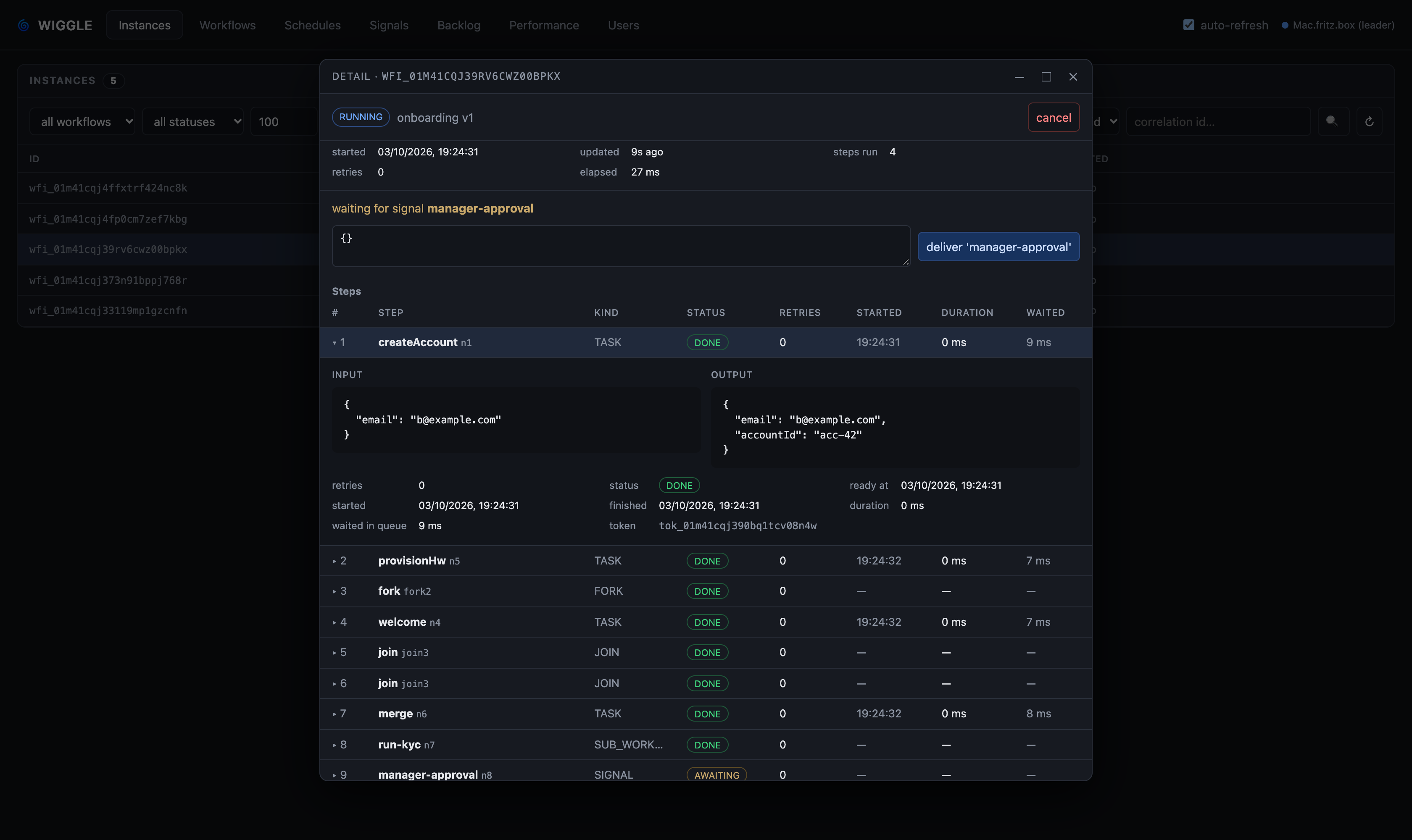
The SPA (ClojureScript + Reagent, source in dashboard-ui/, compiled into the console jar)
has seven tabs: Instances (filter, search by instance id or correlation id, each instance's
steps as a table — click one to expand its input, output, retries and timing — cancel, inline signal
delivery), Workflows (each compiled graph's steps, kinds, queues and retry policies), Schedules (create/delete interval and cron schedules), Signals,
Backlog (dispatchable work no running worker can claim — §7.5),
Performance (per-step p50/p95 by the handler's own clock and queue wait for every
execution mode, slowest first), and Users (§7.1a, for accounts holding user.manage). ./gradlew :console:build compiles the bundle automatically (needs Node;
-PskipDashboard or a missing Node toolchain skips it). Dev loop: cd dashboard-ui &&
npx shadow-cljs watch app (hot reload on :8280, proxying /api to a portal on :8070).
Auth. A role is a named set of permissions. Two are built in: admin (*, everything) and
viewer (read, sees everything and is refused every write). The actions are
read, instance.cancel, instance.signal, schedule.write and user.manage (plus
instance.start and task.poll, reserved for gRPC authorization); the instance and schedule
ones take a workflow scope, so instance.cancel:orders cancels only orders instances. Browsers get a
/login form that sets an HttpOnly session cookie; programmatic clients can use HTTP Basic
auth. Credentials travel cleartext over plain HTTP, so serve over TLS for anything exposed.
Accounts come from two places. Built-in accounts are configured in the environment of the
nodes serving the portal: WIGGLE_DASHBOARD_PASSWORD for the admin (WIGGLE_DASHBOARD_USER, default admin)
and optionally WIGGLE_DASHBOARD_VIEWER_PASSWORD for a viewer (WIGGLE_DASHBOARD_VIEWER_USER,
default viewer). Nothing in the running portal can change them. Managed accounts are the
ones an admin creates in the portal itself (§7.1a).
With no WIGGLE_DASHBOARD_PASSWORD and no account in the database yet, the portal starts in
first-run setup: every page leads to a screen that sets the password of the admin account
(WIGGLE_DASHBOARD_USER, default admin), stores it hashed in the database (the auth shard), and
signs you in. After that the setup screen is gone for good, on every node, and the admin signs in
like any other account. Until it is done, anyone who can reach the portal port can do it, so set
it straight after the first start, or set WIGGLE_DASHBOARD_PASSWORD to skip setup. On the
in-memory store the password goes with the process.
7.1a Users an admin manages§
An account holding user.manage gets a Users tab: create an account with a name, a password
and a role, change its roles, set its password, disable or enable it, or delete it; define roles
from permissions; and read the audit of every change to accounts, roles and sessions. Everyone who signs in with
a managed account can change their own password from the header, proving their current one
first. A viewer may do that too — it is the one write a viewer is allowed, since it changes
nothing but their own account.
Accounts, roles, sessions and the audit live on the auth shard: the database the storage
topology gives the auth role, or the one database of a single-database deployment. Every node
caches what it has looked up for at most WIGGLE_AUTH_CACHE_MILLIS (30 s) and polls the audit
every second, so a password change, a role change, a disable or a deletion takes effect on every
node within about a second. With the auth shard down, people already signed in keep working,
nobody new signs in (503), and the built-in admin still can. No gRPC RPC reads or writes accounts.
A console users file from before (WIGGLE_CONSOLE_USERS_FILE, default wiggle-users.json) is
imported once by the first node to start with it, hashes as they are; after that it is no longer
read, and every node says so at startup.
Passwords are stored as PBKDF2-HMAC-SHA256 hashes over a per-account random salt, and sessions only as a hash of their token: nothing in the database signs anyone in.
Three rules keep a portal reachable:
- A managed account cannot take a built-in account's name, and built-in accounts cannot be deleted or re-passworded from the portal — they are set in the environment.
- With no built-in admin to fall back on, no change may leave no enabled account that can manage users — not deleting, disabling or demoting the last one, not changing the role it relies on, and not creating a first account that could not manage users.
- Creating the first managed account turns authentication on, even if no password was configured. Sign in with the account you just made.
Changing or resetting a password signs out that account's other sessions; the one doing the changing stays signed in. Deleting an account signs it out everywhere.
| Env var | Default | Meaning |
|---|---|---|
WIGGLE_PORTAL_PORT |
8070 |
portal HTTP port; 0 turns it off (and give each node on one host its own) |
WIGGLE_DASHBOARD_USER / WIGGLE_DASHBOARD_PASSWORD |
admin / (unset) |
admin login from the environment; unset = the first visit sets the admin password, kept in the database |
WIGGLE_DASHBOARD_VIEWER_USER / WIGGLE_DASHBOARD_VIEWER_PASSWORD |
viewer / (unset) |
optional read-only account |
WIGGLE_AUTH_CACHE_MILLIS |
30000 |
how long a node serves a cached account or session before reading it again |
WIGGLE_CONSOLE_USERS_FILE |
wiggle-users.json |
an old console users file, imported once (§7.1a) |
WIGGLE_TLS_* |
(unset) | the server's keystore serves the portal over HTTPS too; with a truststore, the portal requires client certificates as gRPC does |
7.1b Authorizing gRPC calls§
Off by default: any peer that can reach the gRPC port may call any RPC. To decide per call:
- In the portal's Users tab, define a role for each kind of caller, then create an API
credential holding it: an API key (shown once, starting
wgk_) or a client certificate subject such asCN=orders-worker,O=Examplefor an mTLS deployment. - Give each worker and service its key as
WIGGLE_API_KEY(or-Dwiggle.api.key; the Go and Python clients send it asauthorization: Bearer <key>metadata). Over plaintext the key is readable on the wire, so use TLS. - Start the servers with
WIGGLE_GRPC_AUTH=logand watch forgRPC auth (log mode)warnings: each is a callenforcewould refuse. When there are none, switch toWIGGLE_GRPC_AUTH=enforce.
Typical roles:
| Caller | Permissions |
|---|---|
a worker for orders |
task.poll (or task.poll:<queue> per queue it serves) and read:orders (it reads the graph) |
a service starting orders |
instance.start:orders, read:orders, plus workflow.register:orders if it publishes the graph |
| an event consumer | event.read |
| operations tooling | read and whatever it changes |
Every RPC's permission is listed in chapter 70 §11 of the spec.
A call without a known credential fails UNAUTHENTICATED (401 in the Java client), one its role does
not allow PERMISSION_DENIED (403). HealthCheck stays open for probes. Deleting a credential, or
changing its role, takes effect on every node within about a second, for the next call: a worker's
open long poll ends as it began, at most WIGGLE_LONGPOLL_MAX_MILLIS later.
| Env var | Default | Meaning |
|---|---|---|
WIGGLE_GRPC_AUTH |
off |
off, log (check and log, serve anyway) or enforce |
WIGGLE_API_KEY |
(unset) | on a client or worker: the key it presents |
7.1a Transport security (TLS / mTLS)§
Opt-in and shared by the gRPC API and the portal's HTTP. A keystore turns TLS on for both;
a truststore additionally requires client certificates (mTLS on the server) and presents a
client certificate (on a worker/client). Unset ⇒ plaintext for both. Stores are PKCS12 by default;
a .jks path is loaded as JKS. Clients/workers read the same variables. TLS secures the channel
and (with mTLS) authenticates the peer, but it is not authorization: what a peer may call is
decided by per-RPC authorization (§7.1b), off unless you turn it on.
| Env var | System property | Default | Meaning |
|---|---|---|---|
WIGGLE_TLS_KEYSTORE |
wiggle.tls.keystore |
(unset) | keystore path; unset = plaintext |
WIGGLE_TLS_KEYSTORE_PASSWORD |
wiggle.tls.keystore.password |
(unset) | keystore password |
WIGGLE_TLS_TRUSTSTORE |
wiggle.tls.truststore |
(unset) | truststore path; server ⇒ require client certs (mTLS) |
WIGGLE_TLS_TRUSTSTORE_PASSWORD |
wiggle.tls.truststore.password |
(unset) | truststore password |
7.1c Full-text search§
Find instances by what they say: the words in their context, correlation id, termination reason or
error. Off by default. Turn it on with a search shard in the storage topology (its own database,
so indexing never costs the instance shards write capacity), or WIGGLE_SEARCH_ENABLED=true on a
single database (the server warns that indexing then shares its capacity).
The leader indexes from the event log, a second or so behind: an instance is indexed when it starts
and each time its status changes, as it is at that moment. Every word you search for must occur;
words are matched as written (no stemming), and results come best first. A document outlives its
instance (WIGGLE_SEARCH_RETENTION_MILLIS, 30 days), so a hit can be shown purged.
WiggleClient.SearchResult r = client.search("ada lovelace", "order-fulfilment", null, null, null, 20, false);
for (WiggleClient.SearchHit hit : r.hits()) {
    System.out.println(hit.instanceId() + " " + hit.status() + (hit.purged() ? " (purged)" : ""));
}
By meaning. With an embedder, a search can rank by closeness in meaning rather than by the
words: client.search(text, …, semantic = true) (the overload's last argument), or by meaning
in the portal. Set WIGGLE_EMBEDDER=http with WIGGLE_EMBEDDER_URL (an OpenAI-compatible API root
such as https://api.openai.com/v1 or Ollama's http://localhost:11434/v1), _MODEL,
_DIMENSION and _API_KEY; WIGGLE_EMBEDDER=hashing tries the path with no model at all. Install
pgvector on the search database for an HNSW index; without it vectors are compared in Java, exactly
and by scan, which suits thousands of documents rather than millions. Semantic search starts once
every existing document has a vector. Changing the model builds a new index beside the old one, and
queries switch when it is complete, as long as the old model stays configured as
WIGGLE_EMBEDDER_PREVIOUS_MODEL until then.
In the portal, pick full text next to the Instances search box. Searches see only the workflows the caller may read. With several search shards, documents spread by instance id; add or drain one and the leader moves documents in the background, a batch a minute.
| Env var | Default | Meaning |
|---|---|---|
WIGGLE_SEARCH_ENABLED |
false |
search on the one database |
WIGGLE_SEARCH_RETENTION_MILLIS |
30 days | how long a document outlives its instance's last change |
WIGGLE_SEARCH_WORKFLOWS |
(all) | comma-separated workflows to index |
WIGGLE_EMBEDDER |
none |
none, hashing or http |
WIGGLE_EMBEDDER_URL / _MODEL / _DIMENSION / _API_KEY |
(unset) | the embedding API, model, vector size and key |
WIGGLE_EMBEDDER_PREVIOUS_MODEL / _DIMENSION |
(unset) | the model being replaced, while the new index builds |
7.2 Storage backends§
No URL → in-memory (single node, dev/test). With one, the server builds its store from an injected
StorageFactory — no ServiceLoader: PostgresStorageFactory maps the URL scheme to a backend
at runtime (the distribution's WiggleStorageFactory is that class under the image's own name). Both dialects live in wiggle-postgres over one HikariCP-pooled
store (wiggle-jdbc): PostgreSQL is what you deploy on, and H2 (in PostgreSQL mode) is for
tests and local runs — it takes the same schema but has no SKIP LOCKED, so it claims tasks by
compare-and-set rather than in a single statement, and is not a deployment target. So the image
serves jdbc:postgresql: and jdbc:h2:.
Embedding the server in your own JVM? new WiggleServer(config, new PostgresStorageFactory()) —
it ships in wiggle-postgres, which brings wiggle-jdbc and wiggle-server with it, so that one
dependency is the whole requirement. StorageFactory is a functional interface, so an application
that wants a different mapping (a dialect of its own, a wrapper that instruments the store) passes
its own lambda instead.
Leader election inside a cluster. Several nodes over one database elect a single leader — the
reconcile and housekeeping loops run only there — using an announce-and-heartbeat scheme (the
election module): every process announces itself and
heartbeats, the longest-running live process leads with ties broken by id, and a process whose own
heartbeat has gone stale stands down before doing leader work. No consensus protocol, because there
is nothing to agree on — the shared table is the only source of truth and the rule over it is a pure
function every process evaluates identically. What makes that safe is that the leader's duties are
idempotent and re-entrant: a brief overlap during failover duplicates work but cannot corrupt state,
and leader-guarded writes are compare-and-set, so a stale ex-leader's write matches zero rows and
loses.
7.3 Signals, sub-workflows and schedules§
thenAwait(name) parks an instance until the named signal arrives; no worker is held. Deliver
via client.signal(instanceId, name, payload) (gRPC), the portal's Signals tab, or
POST /api/instances/{id}/signal/{name} (JSON body merges into the context). Optional deadline:
thenAwait(name, timeout) fails the instance on timeout; the three-arg form runs an escalation
branch instead. Signals are not buffered -- an early delivery is a retryable conflict.
thenSubFlow(node, workflow, Result.class) runs a registered workflow as a child with the parent's context;
its final context merges back, its failure/cancellation fails the parent, and cancelling the
parent cascades to children.
Schedules fire a workflow on a fixed interval or a five-field cron expression (UTC),
leader-driven and exactly-once per fire. From the client: client.createSchedule(workflow,
Duration, context) / createCronSchedule(workflow, "0 3 * * *", context) / schedules() /
deleteSchedule(id) (gRPC). Over HTTP: POST /api/schedules {"workflow", "everyMillis"|"cron",
"context"?}, GET /api/schedules, DELETE /api/schedules/{id}. Creation is an upsert keyed
on workflow name -- a workflow has at most one schedule, so calling create again from any
number of client instances updates it in place rather than creating duplicates.
7.4 Schema migrations§
JdbcStorage runs a versioned, forward-only migration list on startup, tracked in
wf_schema_version, under a cross-node advisory lock, atomic on Postgres. To evolve the schema,
append a Migration(n, "name", sql) — never edit a released one; keep changes backward-compatible
for rolling deploys. Tables: wf_definition, wf_graph_node, wf_graph_edge, wf_instance,
wf_token, wf_node, wf_schema_version.
Each applied migration records a SHA-256 checksum of its source in wf_schema_version; if an
already-applied migration's definition later differs from the code (someone edited a released
migration), startup fails loudly with a drift error rather than silently diverging.
For deployments where a DBA or CI pipeline — not the application — owns DDL:
WIGGLE_MIGRATE_ONLY=true— a one-shot job that applies pending migrations and exits (run it as an init container or a CI step; it forces apply even if the app env pins verify).WIGGLE_SCHEMA_MODE=verify— the app applies nothing; it checks the schema is current and un-drifted and fails fast if it's behind (telling you to run the migrate job first). Run the migrate-only job, then run the app in verify mode with onlySELECT/INSERT/… grants.
7.5 Backlog coverage: work nothing can claim§
A token whose queue nobody polls — or whose version every worker has scoped itself out of
(§5) — sits READY forever. It is not failed, not retried, not late in
any way the engine can see: the instance reads RUNNING and the token reads READY, which is
exactly what a healthy system looks like a moment before a worker picks the work up. No other view
can tell you about it, which is why there is one for it.
Each node remembers which queues and (workflow, version) pairs its current pollers serve, and the
Backlog tab lists the dispatchable backlog grouped by (workflow, version, queue), each slice
flagged covered or not — uncovered first, with how many tasks are stranded on it and how long the
oldest has waited. A slice is covered when some live worker polls that queue and either is
unscoped or named that version, which is the same test the claim applies, so it reports what the
dispatcher would actually do.
Also on the wire as GetBacklogCoverage, and over HTTP at /api/backlog:
{"slices": [{"workflow": "orders", "version": 302800684, "queue": "gpu",
             "readyCount": 41, "oldestAvailableAt": 1757800000000, "covered": false}],
 "uncoveredSlices": 1, "strandedTasks": 41, "livePollers": 3}
The registry behind it is in memory and deliberately not durable — it is written on the poll path and must cost a map write — so it knows only its own node's pollers, and coverage is therefore reported per node. A worker that stops polling stops counting as cover once its entry times out.
7.6 Queue-lag monitoring§
The leader watches whether the dispatchable backlog is draining fast enough (backlog vs
cluster-wide completion rate) and logs a WARNING when it isn't — a sign of too few workers, a
stuck worker pool, or a slow step. Tune with the two WIGGLE_QUEUE_LAG_* knobs (§6.3).
7.7 Benchmarking§
# in-memory (async ≈ sync, commits are free):
WIGGLE_EXECUTION_MODE=LOCAL_ASYNC ./gradlew :example:bench

# against Postgres (async wins — far fewer WAL fsyncs):
docker compose up -d postgres
WIGGLE_EXECUTION_MODE=LOCAL_ASYNC WIGGLE_JDBC_URL=jdbc:postgresql://localhost:5433/wiggle \
  WIGGLE_JDBC_USER=wiggle WIGGLE_JDBC_PASSWORD=wiggle ./gradlew :example:bench
8. Where to go deeper§
README.md— overview, quick start, DSL walkthrough.docs/local-execution.md— execution modes, the wire protocol, the shared traversal seam, and the crash-replay contract per mode.RELEASING.md— publishing to Maven Central.proto/src/main/proto/wiggle.proto— the control-plane wire contract.